
Classroom Phone Guide
(for teachers)
Click here for Printable Version
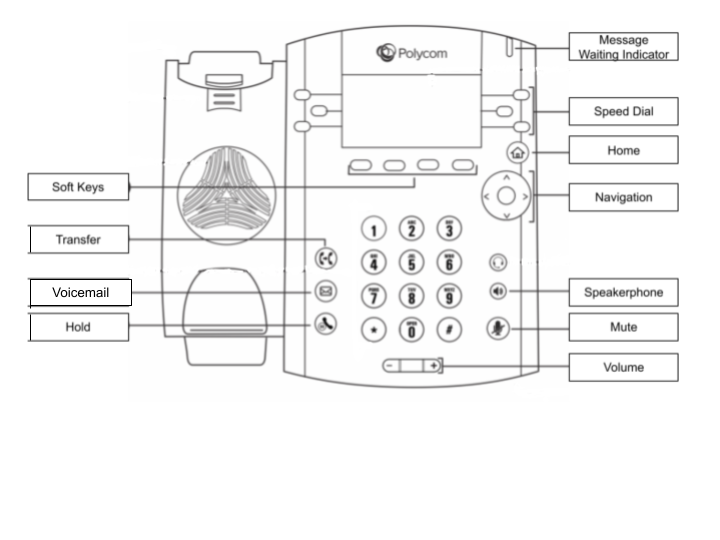
Navigation keys:
Up = Favorites(Speed Dials)
Down = Missed Calls
Left = Received Calls
Right = Placed Calls
Center = Select
Answer Call:
Pick up handset.
To answer on speaker phone press Answer soft key or Speakerphone key
Place Call:
Pick up handset > Enter the phone number > Press Send
Enter Phone number/Extension number > Pick Up Handset
You can also use the Speed Dial keys for quick access to favorites
Voicemail Access:
From Your Phone = Press Envelope button, then connect (You can also dial *1)
From Any School Phone = Dial *2. Enter extension number. Enter Password/Pin (Default pin = 4567).
Listening to Voicemail:
Press 1 for Messages You can press 1 again to skip the message envelope (caller ID/date/time duration/etc.)
Press 4 to Play Previous message
Press 5 to Repeat Message
Press 6 for the Next Message
Press 7 to Delete the current message
Press 8 to Forward the message to another user: enter the extension number
Press 9 to Save a message
*(star key) Rewinds message while playing
#(pound key) Fast-forwards message while playing
Record Voicemail Greeting:
First, dial into the voicemail system and Press 0 for Mailbox Options.Then:
Press 1 to record your Unavailable Message (message callers will hear if you are unable to pick up the phone after the allotted number of rings)
Press 5 to Change your password/pin (must be at least 4 digits long)
** Press # after recording, then be sure to press 1 to confirm and save your greeting**
Transfer a Call (Blind Transfer)
Press Transfer soft key > Blind soft key (caller goes on hold phone gets dial tone)
Dial employee extension/external number.
Press Send soft key. (Phone will pass the original caller #)
Speed Dials:
To add favorites to Speed Dial list, please submit a ticket at https://rcct.freshdesk.com/